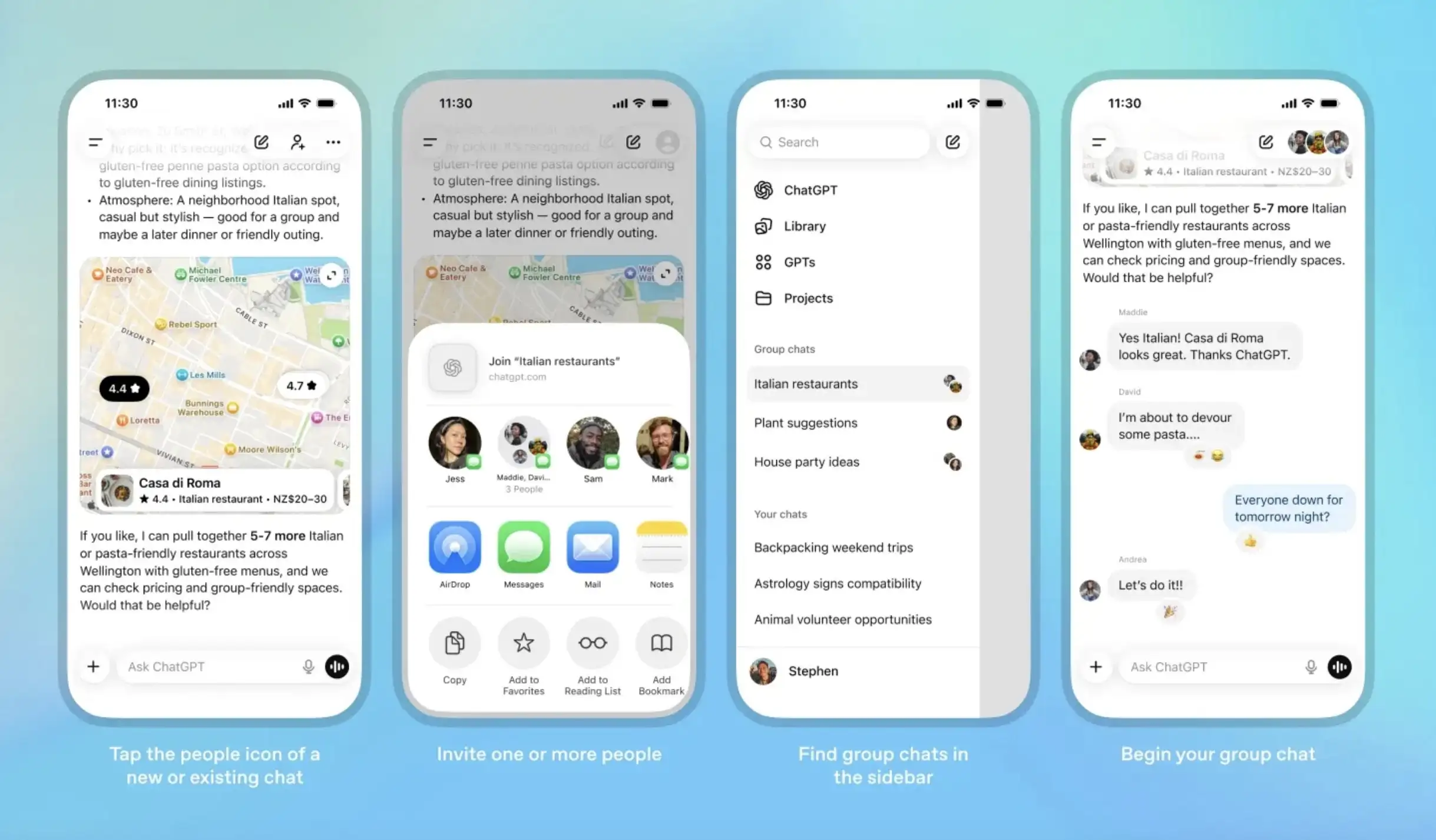
The use of AI tools is no longer limited to just isolated tasks. OpenAI has launched a new and game-changing feature for ChatGPT: Group Chat. However, this group chat will be different from the group chat on WhatsApp or other apps. This feature can change the entire way of team collaboration, because now multiple people will be able to work together in the same chat in real-time with the help of AI.
Until now, the ChatGPT experience was mostly limited to one-on-one interactions. But now, the story has completely changed. With this new feature, you can create a shared chat room where colleagues, friends, or team members can brainstorm, write scripts, fact-check, or work together on a larger project.
The biggest feature of the group chat feature is collaborative intelligence. This means multiple team members can ask questions and make suggestions in the same thread, and Chat GPT interacts with them at the same time. It’s just like you’re sitting in a meeting room, but the difference is that the AI is present with you all the time, acting as a researcher, an editor and sometimes even a producer. This means that many things can be done.
This feature is especially beneficial for content creation teams. Imagine that a news story is being made. One reporter will ask for background information, another will check data, and a third will ask for headline ideas. Meanwhile, AI will understand everyone’s questions and provide real-time input. This will not only save time but will also improve the quality of output.
For startups or small teams, group chat can become a virtual workspace. Here, you can create planning documents like chat, conduct code reviews, plan marketing campaigns, and even put together your meeting notes and to-do lists. ChatGPT will no longer be just a reply bot, but will work like an active member of the team.
OpenAI has also paid special attention to privacy and control. Administrators can decide who can join chats, who can see what, and what types of AI interactions are allowed. The company claims that this will provide both security and transparency to the teams.
Overall, ChatGPT’s group chat feature could usher in a new era: one in which AI and humans will work together faster, smarter, and more effectively. This feature could prove to be a game-changer for workflow, especially for news, education, research and corporate teams.
How to use ChatGPT group chat
Don’t forget to update your ChatGPT app to the latest version. After updating the app, it is very easy to start a group chat on ChatGPT. Simply log in and open a new chat as usual. You’ll see a new people icon in the top right corner. Tap other people to add them to the chat.
When you first create a group, ChatGPT will immediately ask for your name, username, and a photo so everyone in the chat knows who you are. All your group conversations will then appear in a newly labeled section in the sidebar for easy access.
Additionally, when you add someone to an existing chat, ChatGPT automatically creates a separate group version of that conversation. This way, your basic one-on-one chat remains the same.